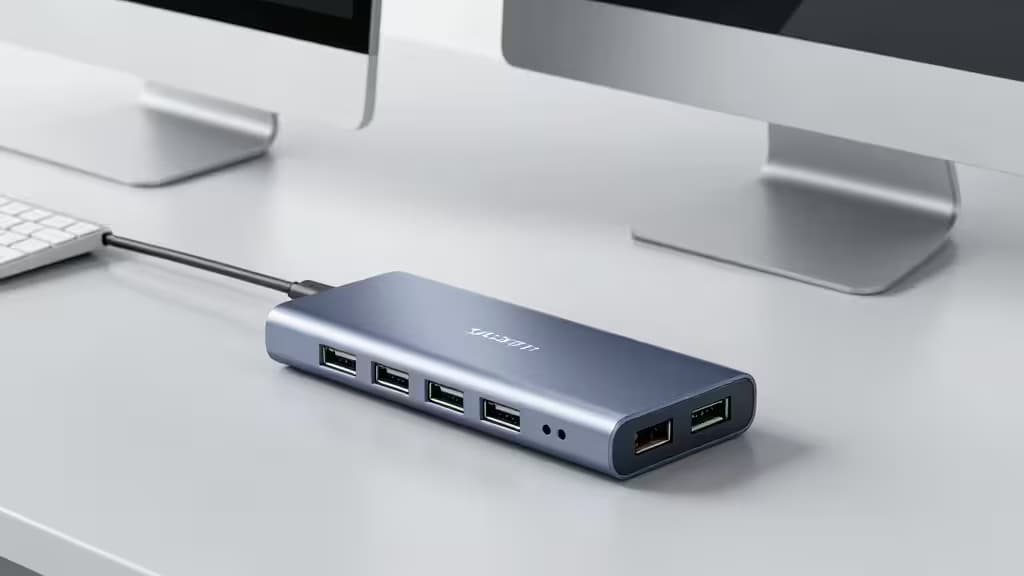
The Mac Studio is a remarkably compact powerhouse, and Apple gave it a generous port selection: front-facing USB-C ports plus rear Thunderbolt 4 / USB-C connectors.5 But here's the thing — there's no USB-A, no HDMI, no Ethernet, and no SD card reader on the chassis. If your workflow involves a wired keyboard, an external display, a hardwired network connection, or pulling photos off a camera card, you need a hub.
That's especially true because the Mac Studio's most useful ports live on the back of the machine. Reaching around to plug in a flash drive or SD card gets old fast. A hub connected to one of the front USB-C ports brings those everyday connections to your fingertips without sacrificing the Thunderbolt 4 bandwidth on the rear.5
We looked at five USB-C hubs that cover the spread — from a do-everything 8-in-1 to a slim travel companion — and evaluated them on port count, power delivery wattage, HDMI resolution and refresh rate, Ethernet inclusion, and build quality. Here's how they stack up.
(Disclosure: Recomate earns affiliate commissions on purchases made through links in this article. That doesn't influence our picks — we recommend what we'd actually use.)
1. Top Pick: Anker 555 8-in-1
The Anker 555 is the hub we'd bolt to most Mac Studio desks. It covers every gap the Mac Studio leaves open: 85W power delivery pass-through, 4K HDMI, Gigabit Ethernet, and both SD and microSD card slots.1 Eight ports in a compact aluminum housing means you're not daisy-chaining adapters.
The 85W PD is the headline number — enough to keep a MacBook Pro charged if the hub ever moves to a laptop, and more than sufficient for bus-powered peripherals on the Mac Studio. Gigabit Ethernet handles wired networking without a separate adapter, and the HDMI output drives a 4K display at 30Hz.1 Anker's build quality and warranty reputation make this the safest all-around choice.
Verdict: The most complete port selection at a fair price. If you want one hub that handles everything, start here.
2. Runner-Up: Anker 341 7-in-1
If you don't need Ethernet, the Anker 341 trims the port count to seven and keeps the essentials: USB-C power delivery, 4K HDMI, and SD/microSD readers.1 It shares Anker's durable aluminum build, so it feels like a premium product rather than a budget compromise.
At roughly $40, the 341 lands in a sweet spot for users whose display and card-reader needs are covered but who still want USB-A and HDMI on the front of the desk. The trade-off is the missing Ethernet port — if you rely on a wired connection, step up to the 555.
Verdict: A well-built, no-frills hub that nails the core ports. Skip it only if you need wired networking.
3. Premium Office Pick: EZQuest 8-Port
The EZQuest 8-Port hub is built for a permanent desk installation. It pushes 100W of power delivery pass-through — the highest in this group — and includes Gigabit Ethernet and 4K HDMI at 30Hz.2 What sets it apart is the labeled ports: each connector is clearly marked, which matters more than you'd think when you're reaching behind a monitor to plug something in.
For a Mac Studio that lives on a desk with a 4K monitor, wired Ethernet, and multiple USB-A peripherals, the EZQuest is the cleanest single-cable solution. The 100W PD headroom means you can charge a laptop through the same hub if your setup ever expands.2
Verdict: The office workhorse. Labeled ports and 100W PD make it ideal for a fixed, multi-device desk.
4. Budget Pick: Ugreen Revodok Pro
The Ugreen Revodok Pro punches well above its price tag. For roughly $16–20 you get 4K HDMI at 60Hz — a step up from the 30Hz caps on the Anker and EZQuest — plus 10Gbps USB 3.2 Gen 2 data speeds and 85W power delivery, all in a slim metal housing.3
The 60Hz HDMI refresh rate is the standout: if your Mac Studio drives a 4K monitor and you want smoother motion for video editing or gaming, this is the only hub in the group that supports it at that resolution. The trade-off is a smaller port count (six) and no Ethernet, but at this price, the value is hard to argue with.
Verdict: The best specs-per-dollar pick. Grab it if 4K 60Hz matters more than port count.
5. Portable Pick: Dockteck 7-in-1
The Dockteck 7-in-1 is the one to throw in a bag. It's the slimmest hub here, with a pocket-friendly profile that still manages 92W power delivery, Gigabit Ethernet, and HDMI.4 Seven ports in a chassis this thin is impressive.
For Mac Studio owners who occasionally move between desks or want a hub that doubles as a travel companion for a MacBook, the Dockteck's 92W PD is nearly class-leading and the Ethernet port means you're never stuck on flaky Wi-Fi.4 The HDMI resolution is 4K at 30Hz — fine for most uses, though not a match for the Ugreen's 60Hz output.
Verdict: The travel-ready option that doesn't skimp on power delivery or Ethernet. Ideal for dual Mac Studio + MacBook households.
How to Choose
| What matters most | Pick this |
|---|
| All-around completeness | Anker 555 8-in-1 |
| No Ethernet needed, solid build | Anker 341 7-in-1 |
| Permanent desk, labeled ports, max PD | EZQuest 8-Port |
| Lowest price, 4K 60Hz | Ugreen Revodok Pro |
| Slim, portable, high PD | Dockteck 7-in-1 |
Port count matters if you have many peripherals — the Anker 555 and EZQuest both offer eight. Power delivery ranges from 85W to 100W across the group; all are sufficient for bus-powered devices, but 100W (EZQuest) gives the most headroom. HDMI refresh rate is the differentiator if you care about smooth 4K: only the Ugreen Revodok Pro hits 60Hz.3 Ethernet is included on the Anker 555, EZQuest, and Dockteck but absent from the Anker 341 and Ugreen. And build quality is consistently aluminum across the board, with Anker and EZQuest feeling the most substantial.
The Mac Studio's port layout is great for permanent cable management but awkward for quick-connect peripherals.5 Any of these hubs solves that problem — the question is which port mix matches your desk.