Why your neck hurts — and what actually fixes it
If you spend hours hunched over a laptop, your neck is paying the tax. The screen sits well below eye level, forcing your head forward and your cervical spine into a position it was never designed to hold for eight hours a day. OSHA's workstation guidelines are blunt about the fix: position the screen at or slightly below eye level, with your head and neck aligned with your torso.6
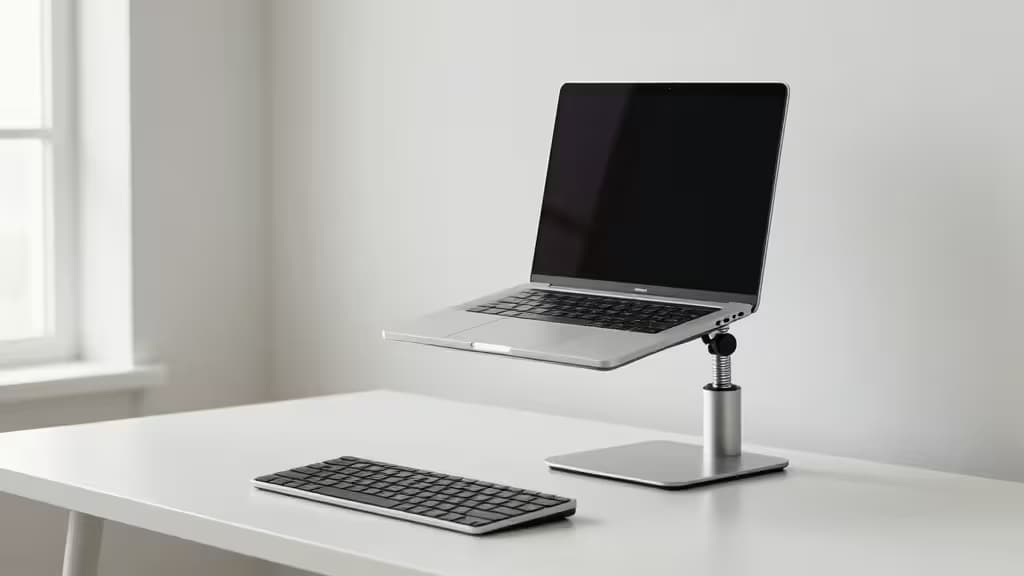
The problem is that a laptop keyboard and screen are attached. Raise the screen to eye level and the keyboard goes with it — unless you separate the two with an external keyboard and mouse. That's the non-negotiable first step. Once you've done that, you need something to hold the laptop (or a monitor) at the right height.
Under $50, two categories dominate: gas-spring monitor arms that give you infinite height and tilt control, and sit-stand converters that lift your entire workspace as a unit. Both work. The arms are sleeker and more adjustable but require a VESA laptop tray adapter (around $10–15) to hold a laptop securely. Converters are plug-and-play but take up more desk space.
We evaluated five options across both categories — the things actually worth buying when your budget is tight and your neck is tighter.
> Disclosure: Recomate earns affiliate commissions on purchases made through links in this article. That doesn't change our picks — we recommend what we'd buy ourselves.
The Picks at a Glance
| Pick | Type | Mechanism | Price |
|---|
| HUANUO Single Monitor Arm | Monitor Arm | Gas spring | Under $50 |
| North Bayou F80 | Monitor Arm | Gas spring | Under $50 |
| VIVO Single Monitor Desk Mount | Monitor Arm | Mechanical | Under $50 |
| FlexiSpot AlcoveRiser M7 | Converter | Manual lift | Under $50 |
1. HUANUO Single Monitor Arm — Best Overall
The HUANUO Single Monitor Arm hits the sweet spot of price, adjustability, and build quality. Its gas spring mechanism lets you raise or lower your screen with one hand — no tools, no knobs to crank — and holds position firmly once set.1 That matters for neck pain specifically: you can micro-adjust throughout the day as your posture shifts, finding the exact height that keeps your cervical spine neutral.
Integrated cable management keeps the desk clean, and both clamp and grommet mounting options are included, so it'll fit most desk thicknesses.1 It supports screens up to 27 inches, which covers the vast majority of laptops mounted via a VESA tray adapter. At under $50, it's the most capable all-around option in this roundup.
Verdict: Smooth gas-spring adjustability and cable management at a price that's hard to beat. Pair it with a $10 VESA laptop tray and an external keyboard for a complete ergonomic setup.
2. North Bayou F80 Gas Spring Arm — Best for Fine-Tuning
If the HUANUO is the all-rounder, the North Bayou F80 is the precision instrument. It shares the gas spring advantage — effortless height and tilt adjustments with a light touch — but supports a wider range of screen sizes, from 17 to 30 inches.2 That broader compatibility makes it a better fit if you're running a larger external monitor alongside (or instead of) your laptop.
The F80's tilt and swivel are notably smooth, which means you can dial in the exact angle that eliminates neck strain without fighting the arm. VESA compatibility is standard.2 Like the HUANUO, it comes in under $50 and needs a VESA laptop tray for laptop use.
Verdict: The pick for anyone who wants granular control over tilt and height. Slightly wider screen support than the HUANUO makes it ideal for mixed laptop-plus-monitor setups.
3. VIVO Single Monitor Desk Mount — Best for Heavier Setups
Not every laptop is a featherweight ultrabook, and not every setup is delicate. The VIVO Single Monitor Desk Mount prioritizes raw stability with steel construction and a straightforward, no-nonsense design.3 It supports screens up to 32 inches — the highest capacity in this group — and the detachable VESA plate makes initial mounting significantly easier than arms with fixed plates.3
The trade-off is that it uses a mechanical (rather than gas-spring) adjustment system. You'll need to loosen, reposition, and retighten rather than float the screen into place. For most people that's a minor inconvenience; for those who rarely change height once set, it's irrelevant.
Verdict: The tank of the group. Steel build and 32-inch support make it the right call for heavier monitors or anyone who values rock-solid stability over one-handed adjustability.
4. FlexiSpot AlcoveRiser M7 — Best Sit-Stand Converter
Not everyone wants to deal with VESA adapters and monitor arms. The FlexiSpot AlcoveRiser M7 takes a different approach: it's a compact, manual sit-stand converter that lifts your laptop (and a bit of workspace) straight up, no mounting hardware required.4
The M7's vertical-lift design saves desk space compared to converters that pivot forward, making it well-suited to smaller desks and tight alcoves.4 Multiple size options let you match the platform to your laptop footprint. The manual mechanism means you're lifting the full weight yourself — less elegant than a gas spring, but reliable and maintenance-free.
Verdict: The plug-and-play choice. If you want to raise your laptop to eye level without buying a VESA tray or clamping anything to your desk, this is the simplest path under $50.
5. Uncaged Ergonomics WorkEZ — Best for Keyboard Separation
Here's the ergonomic truth most laptop stands ignore: raising the screen is only half the battle. If your keyboard goes up with it, you've traded neck pain for shoulder and wrist strain. The Uncaged Ergonomics WorkEZ solves this with a dual-platform design — one riser for the monitor (or laptop screen), one for the keyboard — so each sits at its correct height independently.5
The aluminum construction keeps it lightweight and portable, and the adjustable tilt lets you set the keyboard platform at a comfortable angle.5 It's the most ergonomically thoughtful option in this roundup for laptop users specifically, because it acknowledges that screen height and keyboard height are two separate problems.
Verdict: The only pick here that properly separates keyboard and screen height by design. If you're using a laptop without an external keyboard, this is the one that actually addresses the full ergonomic picture.
How to Choose
Go with a monitor arm (picks 1–3) if you already use (or are willing to buy) an external keyboard and mouse, and you want the sleekest, most adjustable setup. Budget an extra $10–15 for a VESA laptop tray adapter. Gas-spring arms (HUANUO, North Bayou) are best for frequent adjustments; the VIVO's mechanical arm is better for set-it-and-forget-it stability.
Go with a converter (picks 4–5) if you want something that works out of the box with no adapters or clamping. The FlexiSpot M7 is the compact, space-saving option; the WorkEZ is the one that properly separates keyboard and screen height — the most important ergonomic factor for laptop users.
Either way, the goal is the same: screen at eye level, shoulders relaxed, head balanced over your spine. As OSHA puts it, your head and neck should be aligned with your torso — not craned forward toward a screen that's sitting flat on your desk.6 Every pick here gets you closer to that goal for under $50.