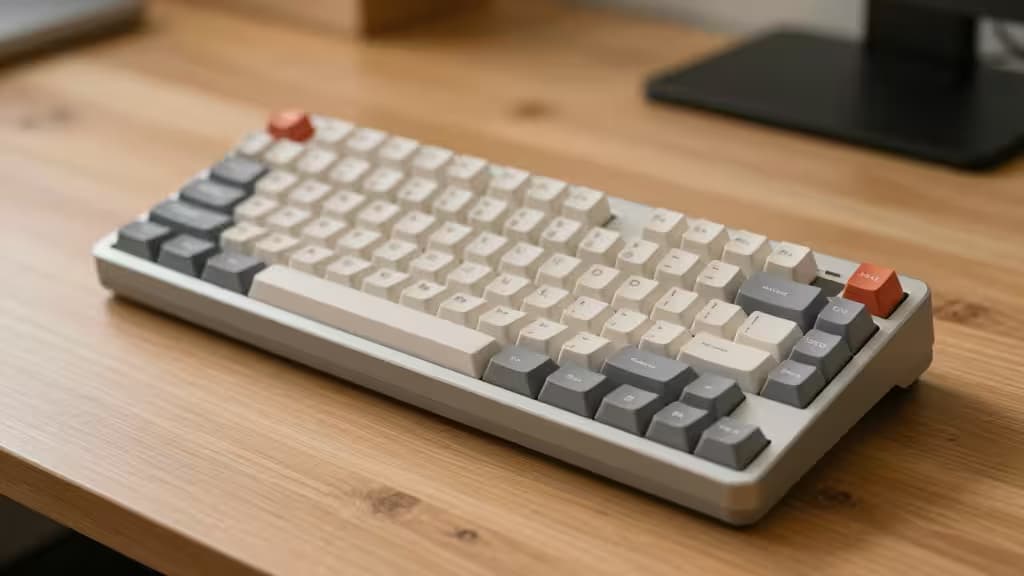
If you've ever felt like your keyboard was designed for someone with a wingspan twice yours, you're not imagining it. Most mechanical keyboards are built around a full-size layout that forces small hands to stretch across function rows, navigation clusters, and numpads—often with tall switches that demand more finger extension than is comfortable over long sessions.
The fix isn't a smaller keyboard for its own sake. It's a keyboard that reduces horizontal reach (so your right hand doesn't travel far to reach the mouse) and vertical extension (so your fingers aren't constantly pressing down through tall switch housings). Two design choices address these directly: compact layouts (60% and 65%) that strip away unnecessary keys, and low-profile or ergonomic (Alice) layouts that reduce finger travel height and wrist pronation.
We evaluated five compact mechanical keyboards that each tackle at least one of these problems—and our top pick tackles both. Here's how they stack up.
How We Evaluated
Every keyboard here was assessed against five criteria that matter specifically for smaller hands:
- Layout footprint. Fewer keys = less horizontal stretch. 60% boards are the smallest mainstream option; 65% adds arrow keys; Alice layouts split the board at an angle; TKL is the largest but still compact versus full-size.
- Switch profile. Low-profile switches (like NuPhy's or Cherry MX Low Profile) reduce the distance your fingers travel per keystroke, which matters more than you'd think over an eight-hour day.7
- Connectivity. Tri-mode wireless (Bluetooth + 2.4GHz + wired) gives flexibility; some users prefer the simplicity of a single connection type.
- Hot-swap support. Being able to change switches without soldering means you can fine-tune actuation force—a real advantage for lighter fingers.
- Programmability. QMK/VIA support lets you remap layers, so a 60% board can still access every key you need without stretching.
Disclosure: Recomate earns affiliate commissions on purchases made through links in this guide. That doesn't influence our rankings—we pick what fits the brief.
The Picks
1. NuPhy Air60 V2 — Best Overall for Small Hands
The Air60 V2 is the keyboard we'd hand to anyone with smaller hands who wants a single board that addresses every comfort factor at once. It's a 60% layout, meaning no function row, no arrow cluster, no numpad—just the core alphanumeric block in the smallest mainstream footprint available.1 That alone cuts horizontal reach significantly, bringing the mouse closer to your resting hand position.
What sets it apart is the low-profile switch design. Where standard mechanical switches sit 11–12mm tall, low-profile switches shave several millimeters off that height, reducing the distance your fingertips travel per press.7 For small hands, that translates to less finger fatigue over long typing sessions. The Air60 V2 pairs this with tri-mode wireless (Bluetooth, 2.4GHz, and USB-C wired) and full QMK/VIA programmability, so you can build custom layers to access any missing keys without moving your hands.1
If you want the smallest footprint and the lowest profile in one package, this is it.
2. Corsair K70 RGB Pro Mini Wireless — Best for Gamers
Gamers with small hands face a slightly different problem: you need compact reach and competitive performance. The K70 RGB Pro Mini Wireless delivers on both. It shares the 60% layout of our top pick, keeping the mouse-hand stretch minimal, but it's built around gaming priorities: an 8,000Hz polling rate for sub-millisecond input latency, hot-swappable switches so you can dial in your preferred actuation force, and both Bluetooth and 2.4GHz wireless options.2
The switches here are standard-profile rather than low-profile, so there's more vertical travel than the Air60 V2. But for gamers who prioritize response time and switch customization over minimal finger extension, that's a reasonable trade-off. The board falls in the $199–$217 range, making it a premium pick—justified by the polling rate and build quality, but worth knowing if budget is a factor.2
3. Drop CSTM65 — Best for Productivity Users Who Need Arrow Keys
The 60% layout is great for reach, but some users genuinely can't live without dedicated arrow keys. The CSTM65's 65% layout adds exactly those—plus a few navigation keys—while keeping the footprint compact enough for small workspaces.3 At $129, it sits in a mid-range price band that makes it accessible without cutting corners on build quality.
Drop's signature feature here is the swappable frame system, which lets you change the keyboard's exterior shell for different colors and materials. It's a cosmetic feature, but it also means the board is designed with modularity in mind—a good sign for long-term ownership. The CSTM65 is a wired-only board, so if wireless is a must, look elsewhere. But for desk-bound productivity users who want arrow keys without a full-size board, it's the sweet spot.3
4. Keychron V8 Max — Best Ergonomic Compact Option
Not every small-hands problem is about horizontal reach. If your discomfort comes from wrist angle—the way a flat keyboard forces your forearms into pronation—an Alice layout addresses that directly. The V8 Max splits the keyboard down the middle and angles each half outward, letting your wrists sit in a more natural position without learning a fully split ergonomic board.4
Keychron describes it as offering "a great balance of ergonomics and a low learning curve," and that's accurate: the Alice layout takes maybe a day to adjust to, not weeks.4 The V8 Max adds gasket mounting (which softens the typing feel), tri-mode wireless, and full QMK/VIA support. At $100–$110, it's also the most affordable pick on this list.4 The switches are standard-profile, not low-profile, but the ergonomic angle compensates by reducing wrist strain rather than finger extension. If your pain is in your wrists rather than your fingertips, this is the pick.
5. Keychron V3 Max — Best Compact Option With a Function Row
Some users need more keys than a 60% or 65% board can offer—particularly a function row and a navigation cluster—but still want something smaller than a full-size keyboard. The V3 Max is a tenkeyless (TKL) board, which strips the numpad but retains the function row, arrow keys, and nav cluster. It's the largest pick here, but still meaningfully more compact than a full-size board.5
The standout feature is the rotary knob, which can be programmed via VIA to control volume, scroll, or any custom function. The board is hot-swappable, supports both Mac and Windows layouts out of the box, and offers tri-mode wireless. At $115, it's well-priced for a feature-rich TKL.5 This is the pick for users whose hands are small but whose workflow genuinely requires those extra keys.
How They Compare
| Layout | Switch Profile | Connectivity |
|---|
| NuPhy Air60 V2 | 60% | Low-profile | Tri-mode wireless |
| Corsair K70 Pro Mini | 60% | Standard | Bluetooth / 2.4GHz |
| Drop CSTM65 | 65% | Standard | Wired |
| Keychron V8 Max | Alice ergonomic | Standard | Tri-mode wireless |
The NuPhy Air60 V2 is the only pick that combines a sub-65% layout with low-profile switches—making it the clear leader for minimizing both horizontal and vertical finger travel. The Keychron V8 Max takes a different approach, using the Alice layout to address wrist angle rather than switch height. The remaining three picks each occupy a distinct niche: gaming performance (Corsair), arrow-key productivity (Drop), and full nav-cluster functionality (Keychron V3 Max).
The Bottom Line
For small hands, the two factors that matter most are reduced key count (so your right hand doesn't stretch to the mouse) and low-profile or ergonomic layouts (to reduce finger extension and wrist pronation). The NuPhy Air60 V2 addresses both, which is why it's our top pick. If wrist angle is your primary concern, the Keychron V8 Max and its Alice layout is the better call. And if you need gaming performance, dedicated arrow keys, or a function row, the other three picks each fill that gap without ballooning to full-size dimensions.
These are the things actually worth buying—compact keyboards that fit your hands, not the other way around.